


Best Laptops for Students Under ₹50,000 in 2026
Buying a laptop as a student has become more complicated than ever. With dozens of models offering similar specifications, flashy marketing, and constantly changing prices, choosing the right laptop can feel overwhelming. While premium laptops deliver excellent performance, they are often far beyond a student’s budget. Fortunately, the ₹50,000 segment has improved significantly in recent years, offering capable processors, fast SSD storage, modern connectivity, and even premium features like OLED displays.
Whether you’re attending online classes, writing assignments, learning programming, editing presentations, or simply watching movies after class, a well-chosen laptop can easily last four to five years. The key is selecting a model that offers the right balance of performance, battery life, display quality, portability, and long-term reliability rather than focusing solely on processor names or RAM capacity.
Table of Contents
Laptop for Students: How We Selected These Laptops
Rather than recommending laptops based solely on processor specifications, we evaluated each model from a student’s perspective. Every recommendation was chosen after comparing performance, upgrade options, battery life, display quality, keyboard comfort, portability, pricing, and overall value for money.
Our goal was to recommend laptops that can comfortably handle everyday academic tasks while remaining useful for several years. We also considered software support, after-sales service, and hardware reliability, which are often overlooked when comparing specifications.
| Evaluation Criteria | Importance |
|---|---|
| Processor Performance | ★★★★★ |
| Display Quality | ★★★★★ |
| Battery Life | ★★★★☆ |
| Upgradeability | ★★★★☆ |
| Build Quality | ★★★★☆ |
| Value for Money | ★★★★★ |
Buying Tip: In 2026, students should prioritize SSD storage, at least 16GB RAM (or an upgradeable 8GB configuration), and modern Ryzen 7000-series or Intel Core 13th/14th Gen processors. These specifications ensure smoother multitasking and better long-term usability.
ASUS VivoBook Go 15 OLED (E1504F)
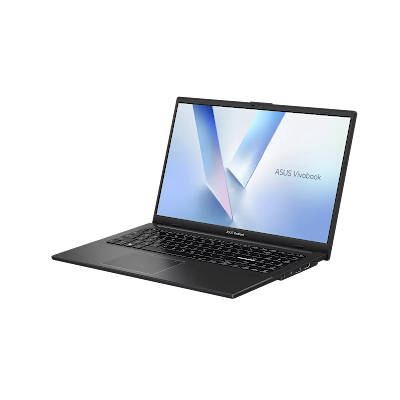
If display quality is your top priority, the ASUS VivoBook Go 15 OLED is one of the most compelling laptops available under ₹50,000. While many competitors still use basic IPS or TN panels, ASUS includes a vibrant Full HD OLED display that dramatically improves the viewing experience.
Whether you’re reading PDFs, attending online classes, editing documents, or watching Netflix after college, the OLED screen offers deeper blacks, richer colours, and higher contrast than conventional LCD panels. S
Key Specifications
| Processor | AMD Ryzen 5 7520U |
| Graphics | Integrated AMD Radeon 610M |
| RAM | 16GB LPDDR5 |
| Storage | 512GB PCIe SSD |
| Display | 15.6-inch Full HD OLED, 100% DCI-P3 |
| Brightness | Up to 600 nits (HDR) |
| Operating System | Windows 11 Home |
| Office | Microsoft Office Home & Student 2024 |
| Wireless | Wi-Fi 6E + Bluetooth 5 |
| Weight | Approximately 1.63 kg |
Design and Build Quality
The VivoBook Go 15 features a minimalist design that looks clean and modern without drawing unnecessary attention. Although the chassis is primarily plastic, it feels well assembled and remains lightweight enough for students who carry their laptop between classrooms or libraries every day.
Display Experience
The OLED display is easily the highlight of this laptop. Text appears sharper, colours are richer, and dark scenes look significantly better than on standard IPS displays. If you enjoy watching YouTube, Netflix, or Disney+ during your free time, this laptop delivers one of the best multimedia experiences in its price category.
The display also benefits students working with presentations, graphic design basics, Canva, or photo editing, thanks to its wider colour gamut.
Performance
Powered by AMD’s Ryzen 5 7520U processor and paired with 16GB of LPDDR5 memory, the VivoBook Go 15 comfortably handles everyday workloads including:
- Microsoft Office
- Google Chrome with multiple tabs
- Zoom and Google Meet classes
- VS Code for beginner programming
- Python development
- Canva and Figma
- Light Photoshop editing
- Streaming and entertainment
However, students working on demanding video editing projects, large AutoCAD files, or AAA games should consider a laptop with a more powerful processor or dedicated graphics.
Battery Life
In typical student usage—including web browsing, note-taking, online classes, and document editing—the laptop delivers around 6 to 8 hours of battery life. While not class-leading, it is sufficient for most college schedules.
Keyboard and Connectivity
The keyboard offers comfortable key travel for long typing sessions, making it suitable for assignments and reports. The laptop also includes USB-C, USB-A, HDMI, Wi-Fi 6E, and Bluetooth 5, ensuring compatibility with modern accessories and peripherals.
Pros
- Excellent OLED display rarely found under ₹50,000
- 16GB LPDDR5 RAM ensures smooth multitasking
- Fast PCIe SSD storage
- Lightweight and portable design
- Windows 11 and Microsoft Office included
- Modern Wi-Fi 6E connectivity
- Excellent value for media consumption and everyday productivity
Cons
- Processor is designed for everyday workloads rather than heavy
professional software - RAM cannot be upgraded later
- 60Hz refresh rate
- Plastic construction
- Battery life is good but not exceptional
Verdict
The ASUS VivoBook Go 15 OLED is one of the easiest recommendations in this price range. While it isn’t the fastest laptop available, its outstanding OLED display, generous 16GB RAM, and balanced feature set make it an excellent choice for school, college, office work, and entertainment. Students who value display quality above everything else will find very few competitors that offer a better overall experience under ₹50,000.
HP 15 255R G10 (Ryzen 5 7535U)
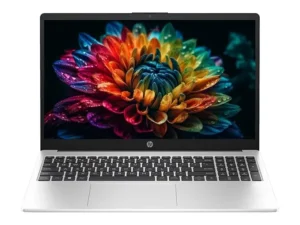
If your coursework involves programming, heavy multitasking, data analysis, or running multiple applications simultaneously, the HP 15 255R G10 is the strongest performer in this price segment. Unlike many entry-level laptops that prioritize appearance over performance, HP focuses on delivering faster processing power, upgradeable memory, and modern connectivity.
The Ryzen 5 7535U processor is noticeably more capable than the Ryzen 5 7520U found in many competing laptops. It features a newer Zen 3+ architecture with more CPU power and significantly stronger integrated Radeon 660M graphics, making it a better long-term investment for students pursuing engineering, computer science, business analytics, or other demanding academic programs.
Key Specifications
| Processor | AMD Ryzen 5 7535U |
| Graphics | AMD Radeon 660M Integrated Graphics |
| RAM | 8GB DDR5 (Upgradeable) |
| Storage | 512GB PCIe NVMe SSD |
| Display | 15.6-inch Full HD IPS |
| Operating System | Windows 11 Home |
| Office | Microsoft Office Home & Student |
| Wireless | Wi-Fi 6E + Bluetooth 5.3 |
| Battery | 41Wh |
| Weight | Approximately 1.7kg |
Design and Build Quality
The HP 15 follows a practical design philosophy. It doesn’t try to look like a gaming laptop or an ultrabook, but it feels sturdy enough for daily college use. The hinge is stable, the keyboard deck has minimal flex, and the overall construction inspires confidence despite the predominantly plastic chassis.
Performance
Performance is where this laptop truly shines. The Ryzen 5 7535U delivers noticeably better multi-core performance than entry-level Ryzen 7000-series chips, making everyday multitasking feel effortless.
Students can comfortably work with:
- Visual Studio Code
- Android Studio (small to medium projects)
- Python development
- Java programming
- MATLAB
- Power BI
- Excel with large spreadsheets
- Virtual meetings while multitasking
- Adobe Photoshop
- Light Adobe Premiere Pro editing
The integrated Radeon 660M graphics also outperform many entry-level integrated GPUs, allowing casual gaming and hardware-accelerated creative workloads without requiring a dedicated graphics card.
Display Experience
Although the Full HD IPS display isn’t as vibrant as ASUS’s OLED panel, it delivers good sharpness, wide viewing angles, and comfortable readability for everyday academic work. Students primarily focused on productivity will likely find it more than adequate.
Battery Life
Battery life is respectable, typically lasting between six and seven hours under normal student workloads. While not exceptional, it is sufficient for lectures, assignments, and regular productivity sessions.
Upgradeability
One of the biggest advantages of the HP 15 is its upgradeable DDR5 memory. Students can begin with 8GB RAM and upgrade to 16GB or more later, extending the laptop’s usable lifespan without replacing the entire system.
Pros
- Excellent Ryzen 5 7535U processor
- Powerful Radeon 660M integrated graphics
- Upgradeable DDR5 memory
- Fast PCIe SSD
- USB-C with DisplayPort and Power Delivery support
- Reliable Wi-Fi 6E connectivity
- Outstanding value for programming and productivity
Cons
- Display quality is average compared to OLED competitors
- Plastic chassis
- 720p webcam is only adequate
- Battery life could be better
- Base model includes only 8GB RAM
Verdict
For students who prioritize performance over display quality, the HP 15 255R G10 is one of the smartest purchases under ₹50,000. Its Ryzen 5 7535U processor offers excellent long-term value, making it particularly suitable for programming, engineering, multitasking, and productivity-focused users.
Lenovo IdeaPad Slim 3 (Ryzen 5 7520U)
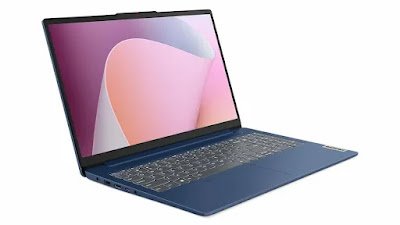
The Lenovo IdeaPad Slim 3 has earned its reputation as one of the safest laptop recommendations for students. Rather than excelling in a single category, it offers a well-balanced combination of portability, reliability, battery life, and everyday performance.
For students who simply need a dependable laptop that works consistently throughout their college years, the IdeaPad Slim 3 remains an excellent choice.
Key Specifications
| Processor | AMD Ryzen 5 7520U |
| Graphics | AMD Radeon 610M |
| RAM | 8GB (Upgradeable to 16GB on supported models) |
| Storage | 512GB PCIe SSD |
| Display | 15.6-inch Full HD Anti-Glare |
| Brightness | 300 nits |
| Operating System | Windows 11 Home |
| Office | Microsoft Office Home & Student 2024 |
| Battery | 47Wh |
| Weight | Approximately 1.6kg |
Design and Portability
Lenovo has focused on making the IdeaPad Slim 3 lightweight and easy to carry. The clean design fits equally well in classrooms, libraries, and offices. At roughly 1.6kg, it is comfortable to carry throughout the day.
Display Experience
The anti-glare Full HD display minimizes reflections, making it easier to work under bright classroom lighting. Although it cannot match OLED displays for colour accuracy, it provides a comfortable viewing experience during long study sessions.
Performance
The Ryzen 5 7520U processor is designed for mainstream productivity rather than heavy professional workloads. It performs well during everyday student activities, including:
- Microsoft Office
- Google Docs
- Research with multiple browser tabs
- Video conferencing
- Basic coding
- Streaming services
- PDF editing
- Presentation creation
Students working with large engineering software or advanced video editing projects may benefit from the more powerful HP model, but for most academic users, the IdeaPad Slim 3 offers more than enough performance.
Battery Life
Its 47Wh battery provides dependable all-day productivity, often lasting between seven and eight hours under typical classroom workloads. Combined with its lightweight design, this makes it an excellent travel companion.
Keyboard and User Experience
Lenovo keyboards have consistently ranked among the best in this category, offering good key travel and tactile feedback. Students typing lengthy assignments or reports will likely appreciate the comfortable typing experience.
Pros
- Lightweight and portable
- Comfortable keyboard
- Anti-glare Full HD display
- Reliable battery life
- Fast SSD storage
- Good port selection
- Strong overall value
Cons
- Ryzen 5 7520U isn’t ideal for demanding software
- Display colour accuracy is average
- Integrated graphics limit gaming performance
- Webcam quality is basic
Verdict
The Lenovo IdeaPad Slim 3 is the most balanced laptop in this comparison. It delivers a comfortable keyboard, dependable battery life, practical portability, and reliable everyday performance, making it an excellent choice for the majority of students.
Laptop Comparison
| Feature | ASUS VivoBook Go 15 OLED | HP 15 255R G10 | Lenovo IdeaPad Slim 3 |
|---|---|---|---|
| Processor | Ryzen 5 7520U | Ryzen 5 7535U | Ryzen 5 7520U |
| RAM | 16GB LPDDR5 | 8GB DDR5 (Upgradeable) | 8GB (Upgradeable) |
| Storage | 512GB SSD | 512GB SSD | 512GB SSD |
| Display | 15.6″ OLED | 15.6″ IPS | 15.6″ Anti-Glare IPS |
| Battery | 6–8 Hours | 6–7 Hours | 7–8 Hours |
| Weight | 1.63kg | 1.70kg | 1.60kg |
| Best For | Media & Everyday Use | Programming & Performance | Balanced Student Use |
Quick Recommendations
| Category | Winner |
|---|---|
| Best Display | 🏆 ASUS VivoBook Go 15 OLED |
| Best Performance | 🏆 HP 15 255R G10 |
| Best Battery Life | 🏆 Lenovo IdeaPad Slim 3 |
| Best for Programming | 🏆 HP 15 255R G10 |
| Best for Engineering Students | 🏆 HP 15 255R G10 |
| Best for Watching Movies | 🏆 ASUS VivoBook Go 15 OLED |
| Best Overall Value | 🏆 Lenovo IdeaPad Slim 3 |
Which Laptop Should You Buy?
Each of these laptops excels in different areas, so the best choice depends on your coursework, budget, and daily usage. Instead of choosing solely based on specifications, consider how you’ll use the laptop over the next four to five years.
| Use Case | Recommended Laptop | Why? |
|---|---|---|
| College Students | Lenovo IdeaPad Slim 3 | Balanced performance, good battery life, lightweight design, and comfortable keyboard. |
| Engineering Students | HP 15 255R G10 | The Ryzen 5 7535U processor handles coding, simulations, and multitasking much better. |
| Computer Science Students | HP 15 255R G10 | Better CPU performance and upgradeable DDR5 RAM make it ideal for programming. |
| MBA & Commerce Students | Lenovo IdeaPad Slim 3 | Excellent portability for presentations, Office work, and everyday productivity. |
| Medical Students | ASUS VivoBook Go 15 OLED | Outstanding OLED display makes reading notes, PDFs, and educational videos more enjoyable. |
| Content Consumption | ASUS VivoBook Go 15 OLED | OLED display delivers superior colours, contrast, and viewing experience. |
| Basic Photo Editing | HP 15 255R G10 | Faster processor and Radeon 660M graphics offer better creative performance. |
| Everyday Productivity | Lenovo IdeaPad Slim 3 | Reliable all-round performance with dependable battery life. |
Our Overall Recommendation
If you simply want the safest laptop recommendation under ₹50,000, the Lenovo IdeaPad Slim 3 offers the best balance of portability, battery life, usability, and long-term reliability.
If performance matters more than anything else, choose the HP 15 255R G10. If display quality is your highest priority, the ASUS VivoBook Go 15 OLED remains unmatched in this price range.
Laptop Buying Tips for Students in 2026
Many buyers focus only on processor names or RAM capacity, but a good student laptop should offer a balanced combination of performance, battery life, display quality, and future upgrade options.
1. Prioritize SSD Storage
Avoid laptops that still use traditional hard drives. A PCIe SSD significantly improves boot times, application loading, and overall system responsiveness.
2. Choose at Least 16GB RAM or Upgradeable Memory
Modern browsers, productivity software, AI tools, and multitasking consume more memory than ever. If your budget only allows 8GB RAM, ensure the laptop supports future upgrades.
3. Don’t Ignore the Display
Students often spend several hours each day reading documents, attending online classes, or writing assignments. A Full HD IPS or OLED display provides a much more comfortable experience than lower-quality panels.
4. Consider Long-Term Value
A slightly more expensive laptop with better performance or upgradeability can remain useful for several additional years, making it a smarter investment over time.
5. Check Warranty and Service Availability
Before purchasing, verify that the manufacturer has authorized service centres in your city. Reliable after-sales support can save both time and money if repairs are ever needed.
Related Readings
Frequently Asked Questions (FAQs)
Which is the best laptop for students under ₹50,000 in 2026?
For most students, the Lenovo IdeaPad Slim 3 offers the best overall balance of performance, battery life, portability, and value. If you prioritize display quality, the ASUS VivoBook Go 15 OLED is an excellent alternative, while the HP 15 255R G10 is better suited for users who need stronger processing power.
Is the Ryzen 5 7520U still good in 2026?
Yes. The Ryzen 5 7520U remains suitable for everyday tasks such as web browsing, Microsoft Office, online classes, programming basics, and multimedia consumption. However, users working with demanding software may benefit from the Ryzen 5 7535U.
Is 8GB RAM enough for students?
For light productivity and online learning, 8GB RAM is still usable. However, 16GB RAM is recommended for smoother multitasking and improved long-term performance. If purchasing an 8GB laptop, choose one with upgradeable memory whenever possible.
Can these laptops handle programming?
Yes. All three laptops can run Visual Studio Code, Python, Java, and other popular development tools. Students working with Android Studio, Docker, virtual machines, or larger projects should consider the HP 15 255R G10 for its stronger processor.
Can these laptops run AutoCAD?
These laptops can handle basic 2D AutoCAD work. For complex 3D modeling, rendering, or professional CAD workloads, a laptop with a dedicated graphics card is recommended.
Which laptop has the best display?
The ASUS VivoBook Go 15 OLED features the best display in this comparison. Its OLED panel offers richer colours, deeper blacks, and significantly better contrast than standard IPS displays.
Which laptop offers the best battery life?
The Lenovo IdeaPad Slim 3 generally provides the longest battery life under normal student workloads, making it a dependable choice for lectures and travel.
Should I buy during online sales?
Yes. Major shopping events often reduce laptop prices significantly, allowing you to purchase higher configurations within the same budget. Compare prices across trusted retailers before making your final decision.
Final Verdict
Finding the right student laptop under ₹50,000 no longer means compromising on performance or essential features. Modern processors, fast SSD storage, Wi-Fi 6 connectivity, and improved battery efficiency have made this budget segment more competitive than ever.
Each laptop in this guide caters to a different type of user:
- ASUS VivoBook Go 15 OLED is the best choice if display quality, multimedia consumption, and a premium viewing experience matter most.
- HP 15 255R G10 delivers the strongest overall performance, making it ideal for programming, engineering, and demanding multitasking.
- Lenovo IdeaPad Slim 3 remains the safest all-round recommendation, offering dependable battery life, good portability, and balanced everyday performance.
Before purchasing, compare the latest prices and available configurations, as retailers often offer different RAM, storage, and software bundles. Spending a little extra on additional RAM or a better processor can improve your laptop’s lifespan and provide a better experience throughout your academic journey.
Editor’s Choice
🏆 Best Overall: Lenovo IdeaPad Slim 3
⚡ Best Performance: HP 15 255R G10
🎬 Best Display: ASUS VivoBook Go 15 OLED