

How to Choose a Laptop in 2026: The Complete Buying Guide
Choosing a laptop in 2026 is no longer as simple as comparing the processor, RAM, and storage. Modern devices come with different CPU architectures, integrated and dedicated GPUs, AI processors, OLED and high-refresh-rate displays, fast SSDs, and increasingly thin designs.
Manufacturers also use terms such as AI PC, NPU, Copilot+ PC, gaming, creator, and premium ultrabook to differentiate their products. While these features can be useful, they don’t automatically mean it’s right for you.
The best laptop is not necessarily the most powerful or expensive model. The right one is the one that matches your workload, budget, portability requirements, and expected lifespan. This buying guide explains what to look for before buying a it in 2026, from the processor and RAM to the display, GPU, battery, cooling system, ports, and upgradeability.
Quick answer: For most students, office users, and general-purpose buyers, a modern laptop with 16GB RAM, a 512GB or 1TB SSD, a capable current-generation processor, and a good-quality Full HD-or-better display is a strong starting point. Gamers, creators, developers, and professionals should choose specifications according to their specific workloads.
Table of Contents
How to Choose the Right Laptop for Your Needs
Before comparing specifications, decide what you will actually do with the laptop.
Buying an expensive device with a powerful processor and dedicated GPU makes little sense if you primarily browse the web, attend online classes, use Microsoft Office, watch videos, and work with documents.
Likewise, buying an inexpensive thin-and-light device may become frustrating if you regularly edit 4K video, render 3D projects, compile large software projects, or play demanding games.
Choose based on your primary workload
| User Type | Recommended Focus |
|---|---|
| Students | Portability, battery life, 16GB RAM, good keyboard, 512GB SSD |
| Office Users | CPU efficiency, battery life, display, webcam, keyboard |
| Teachers & Remote Workers | Webcam, microphone, battery life, ports, comfortable keyboard |
| Developers | CPU performance, 16–32GB RAM, fast SSD, cooling |
| Content Creators | Powerful CPU, dedicated GPU, 32GB+ RAM, color-accurate display |
| Gamers | Dedicated GPU, high-refresh-rate display, cooling, adequate RAM |
| Professionals | CPU performance, RAM, storage, display, reliability, and warranty |
Important: Your workload should determine the specifications—not the other way around.
1. Set Budget First
Before comparing specifications, establish a realistic budget.
A higher price can provide better performance, display quality, build materials, battery life, speakers, cooling, and connectivity. However, spending more does not always provide better value.
For example, a premium gaming laptop may have an extremely powerful GPU, but that extra performance is wasted if you only use the device for documents and web browsing.
Instead of asking:
“What is the most powerful laptop I can afford?”
Ask:
“What is the least expensive laptop that comfortably handles everything I need?”
Also remember to consider the cost of accessories such as a mouse, external storage, stand, USB hub, or monitor.
2. CPU (Processor): The Core of the Device
The CPU handles general computing tasks and plays an important role in application performance, multitasking, productivity, and many professional workloads.
In 2026, you will encounter processors from several major platforms, including:
- Intel Core and Core Ultra processors
- AMD Ryzen processors
- Apple silicon used in MacBooks
- Qualcomm Snapdragon processors in selected Windows devices.
Don’t judge a CPU by its name alone
A common mistake is assuming that a processor with a higher number is automatically better.
For example, a newer mid-range processor can outperform an older high-end processor in some workloads while also providing better efficiency.
When comparing CPUs, consider:
- Generation and architecture
- Number of performance and efficiency cores
- Thread count
- Boost frequency
- Power limits
- Integrated graphics
- NPU/AI performance
- Real-world benchmarks
- Cooling capability
CPU recommendations by workload
| Workload | Recommended CPU Class |
|---|---|
| Basic browsing and Office | Modern entry-level or mid-range CPU |
| Students | Modern mid-range CPU |
| Office & multitasking | Modern mid-range to upper-mid-range CPU |
| Programming | Mid-range or high-performance CPU |
| Photo & video editing | High-performance CPU |
| 3D rendering | High-performance multi-core CPU |
| Gaming | Modern mid-range/high-performance CPU |
| Professional workloads | High-performance CPU |
Tip: Don’t automatically buy the highest-end processor. For many users, a modern mid-range processor provides the best balance between performance, battery life, heat, and price.
3. AI and NPU: Do You Need an AI PC in 2026?
AI has become an important part of the market.
Many modern processors include an NPU (Neural Processing Unit) designed to accelerate certain AI workloads more efficiently than relying entirely on the CPU or GPU.
AI-enabled laptops can use the NPU for supported features such as:
- AI-powered video effects
- Background blur and noise reduction
- Image and audio processing
- Local AI applications
- Productivity features
- Certain Windows AI features
- Generative AI workloads that support local acceleration
However, an “AI PC” does not automatically mean a machine is faster for every task.
For general productivity, CPU performance, RAM, SSD speed, battery life, and display quality may matter more.
If you specifically plan to use local AI applications, image generation, AI-assisted creative software, or other on-device AI workloads, pay attention to its NPU performance, GPU capability, system RAM, and software compatibility.
Buying tip: Don’t buy a laptop solely because it has an “AI PC” label. Check what AI features you will actually use.
4. RAM: How Much Memory Do You Need?
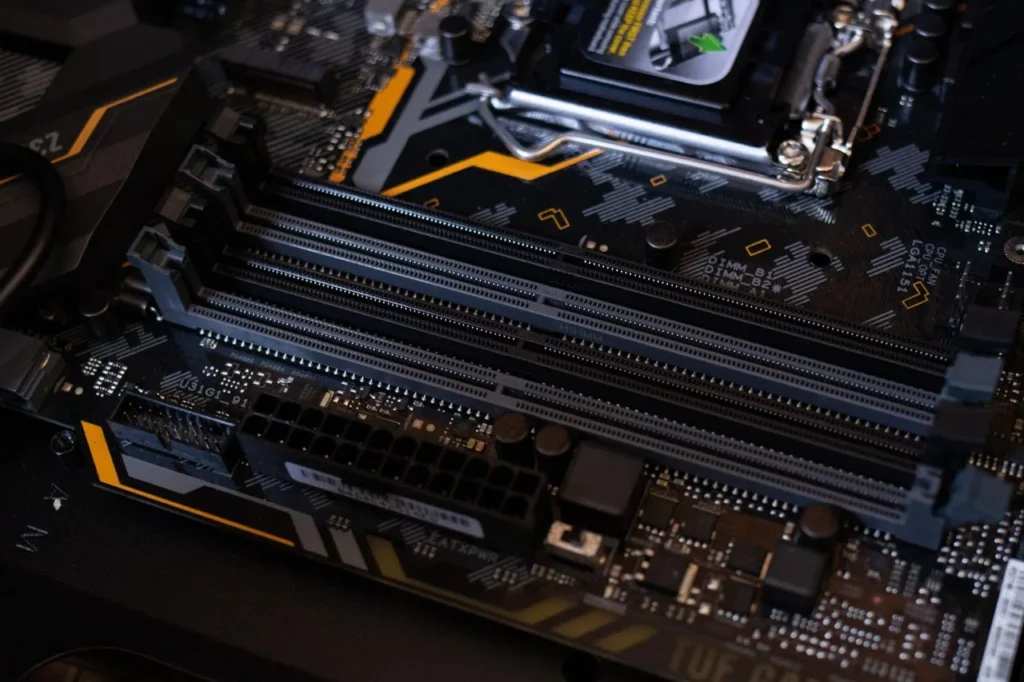
RAM determines how many applications and tasks your machine can comfortably keep active at the same time.
In 2026, 16GB is the practical starting point for most new laptops.
| RAM | Best For |
|---|---|
| 8GB | Basic use and budget |
| 16GB | Most students, office users, and general users |
| 32GB | Developers, creators, heavy multitasking, and professionals |
| 64GB+ | Advanced professional workloads, large projects, and specialized applications |
Is 8GB RAM enough in 2026?
8GB can still work for basic browsing, documents, streaming, and light workloads, but it provides less headroom for future software and demanding multitasking.
If you intend to keep your device for several years, 16GB is the safer choice.
For demanding workloads such as video editing, 3D rendering, virtual machines, software development, and professional creative applications, consider 32GB or more.
Check whether the RAM is upgradeable.
This is particularly important.
Some laptops use soldered or also called LPDDR RAM that cannot be upgraded later. Others provide accessible RAM slots.
If a laptop has 8GB or 16GB soldered memory, make sure that capacity is sufficient for the entire period you expect to use the machine.
What to Avoid If You Want Upgradeability
If a laptop lists LPDDR5 or LPDDR5X in its specifications, the memory chips are soldered directly to the motherboard to save space and power. You will not be able to upgrade the RAM on these machines at any point.
5. GPU: Integrated or Dedicated?
The GPU is responsible for graphics processing.
You don’t necessarily need a dedicated graphics card. Modern integrated GPUs are capable of handling everyday productivity, video playback, light photo editing, and some gaming.
A dedicated GPU becomes more important for:
- Modern gaming
- 3D rendering
- Blender
- CAD
- VFX
- Professional video editing
- AI workloads
- GPU-accelerated applications
Integrated GPU
Best for:
- Students
- Office work
- Web browsing
- Media consumption
- General productivity
- Light gaming
Dedicated GPU
Best for:
- Gaming
- 3D rendering
- Professional creative work
- Advanced video editing
- GPU-accelerated AI workloads
Don’t compare GPUs by model number alone
This is especially important with gaming laptops.
Two laptops using the same GPU family can deliver noticeably different performance depending on:
- GPU power limit/TGP
- Cooling system
- CPU
- RAM configuration
- Thermal design
- Chassis
Therefore, never assume that two laptops with the same GPU will perform identically.
For gaming, check real-world benchmarks and the GPU’s power configuration whenever possible.
6. Storage: Always Choose an SSD
An SSD is essential for a modern machine.
Compared with older mechanical hard drives, SSDs provide much faster boot times, application loading, file transfers, and overall responsiveness.
How much storage do you need?
| Storage | Recommended For |
|---|---|
| 256GB SSD | Basic users with limited storage requirements |
| 512GB SSD | Most students and office users |
| 1TB SSD | Gamers, creators, and heavy users |
| 2TB+ SSD | Professionals with large files and game libraries |
For most buyers in 2026, 512GB should be considered the practical minimum, while 1TB is a better long-term choice if the budget allows.
Also check whether it provides an additional SSD slot.
A laptop with upgradeable storage can remain useful for longer because you can expand its capacity later.
7. Display: One of the Most Important Components
You interact with your laptop display every day, so don’t treat it as an afterthought.
A powerful processor paired with a poor-quality display can still result in a disappointing user experience.
Resolution
For most devices, Full HD or higher is appropriate.
Higher resolutions can provide sharper text and images, but they can also consume more power and sometimes require more GPU performance.
Refresh rate
| Refresh Rate | Best For |
|---|---|
| 60Hz | Office work, browsing and general use |
| 90–120Hz | Smooth everyday experience |
| 144Hz+ | Gaming and high-refresh-rate applications |
OLED vs IPS
OLED displays generally provide excellent contrast, deep blacks, and vibrant colors.
IPS displays can provide excellent image quality while often being more affordable and suitable for long productivity sessions.
Neither technology is automatically better for every user.
Creators should check color accuracy.
If you edit photos or videos professionally, look beyond resolution and refresh rate.
Check specifications such as:
- sRGB coverage
- DCI-P3 coverage
- Color accuracy
- Brightness
- Factory calibration
8. Battery Life: Don’t Trust the Advertised Number Blindly
Battery life is one of the most important differences between categories.
Thin-and-light devices generally prioritize efficiency and portability, while gaming and workstation devices prioritize performance.
Real-world battery life depends on:
- Processor efficiency
- Battery capacity
- Display resolution
- Display brightness
- Refresh rate
- Background applications
- Browser usage
- Connected peripherals
- Workload
Manufacturer battery estimates are usually measured under controlled conditions and may not represent your actual usage.
What should you look for?
For a portable laptop, prioritize:
- Efficient processor
- Large battery
- Efficient display
- Good standby time
- USB-C charging where supported
If you frequently travel or teach/work away from a power outlet, battery life may be more important than a small increase in CPU performance.
9. Cooling and Thermal Performance
Cooling is often overlooked when buying a laptop.
A powerful processor and GPU need an adequate cooling system to maintain performance.
Gaming and performance laptops may use:
- Multiple heat pipes
- Vapor chambers
- High-performance fans
- Liquid-metal thermal interfaces
- Multiple exhaust vents
A thin laptop may use a simpler cooling solution because of its smaller chassis.
Why cooling matters
Poor thermal management can lead to:
- Higher temperatures
- Fan noise
- Reduced sustained performance
- Thermal throttling
- Lower gaming performance
This is why two laptops with similar specifications can perform differently.
When buying a performance laptop, check sustained benchmark results and thermal reviews rather than relying solely on the specification sheet.
10. Build Quality, Keyboard and Trackpad
Specifications aren’t everything.
You will physically interact with your laptop every day, so the chassis, keyboard, and trackpad matter.
Check:
- Chassis rigidity
- Hinge quality
- Keyboard travel
- Key layout
- Trackpad size
- Trackpad responsiveness
- Palm rest comfort
- Weight
- Thickness
For students and professionals who carry their laptop every day, a lighter machine can be much more practical than a significantly heavier performance laptop.
11. Weight and Portability
Laptop size has a direct impact on portability.
Thin-and-light laptops
Best for:
- Students
- Teachers
- Office workers
- Travelers
- Remote workers
Performance laptops
Best for:
- Gamers
- Content creators
- Engineers
- 3D professionals
- Users who prioritize performance over portability
A powerful gaming laptop may deliver dramatically higher performance but can be heavier and require a larger power adapter.
If you travel frequently, consider the combined weight of the laptop and charger, not just the laptop itself.
12. Ports and Connectivity
Before buying, check the actual ports included with the laptop.
Important connections may include:
- USB-C
- USB-A
- HDMI
- Headphone jack
- Ethernet
- SD or microSD card reader
USB-C is particularly useful, but not every USB-C port provides the same capabilities.
Check whether it supports:
- Charging
- Display output
- High-speed data
- Thunderbolt or USB4, where applicable
For wireless connectivity, newer laptops may offer Wi-Fi 6, Wi-Fi 6E, or Wi-Fi 7 depending on the model.
Don’t assume a laptop has a particular port just because it is a premium model. Always check the specification sheet.
13. Operating System: Windows, macOS or ChromeOS?
Your operating system should match the software you need.
Windows
A strong choice for:
- Gaming
- Engineering software
- Business applications
- General productivity
- Broad hardware compatibility
macOS
A strong choice for:
- Creative professionals
- Apple ecosystem users
- Long battery life
- Optimized software and hardware integration
ChromeOS
Suitable for:
- Web-based productivity
- Education
- Basic computing
- Users who primarily rely on browser applications
Before buying, check whether the applications you depend on are available on your chosen operating system.
14. Upgradeability and Repairability

A laptop’s specifications on launch day are not the whole story.
A machine that allows you to upgrade the SSD or RAM can remain useful for longer.
Before purchasing, check:
- Is RAM soldered?
- Are there RAM slots?
- Can the SSD be replaced?
- Is there a second SSD slot?
- Can the Wi-Fi card be replaced?
- Is the battery replaceable?
- How easy is the laptop to service?
Upgradeability is especially valuable if you plan to keep your laptop for four or five years.
15. Webcam, Microphone and Speakers
These components have become more important as remote work, online classes, meetings, and video calls have become common.
Check:
- Webcam resolution
- Image quality
- Microphone quality
- Speaker placement
- Noise cancellation
- IR camera support if Windows Hello is important to you
Don’t judge webcam quality solely by megapixel count. Image processing and sensor quality can matter just as much.
16. Warranty and After-Sales Support
A laptop is a significant purchase, so after-sales support should be part of your decision.
Before buying, check:
- Standard warranty period
- Extended warranty options
- Service-center availability
- Accidental damage protection
- Battery warranty
- On-site support availability
A slightly more expensive laptop with better support can sometimes be a smarter purchase than a cheaper model with limited service options.
17. Common Laptop Buying Mistakes
Avoid these common mistakes when choosing a laptop.
Buying based only on the processor name
A CPU model number doesn’t tell the entire story.
Buying a gaming laptop for basic work
Gaming laptops can be heavier, louder, and less convenient for everyday portability.
Buying only 8GB RAM to save money
This can limit multitasking and future usability.
Ignoring the display
A poor display can negatively affect your daily experience even if the internal hardware is excellent.
Looking only at GPU model numbers
Laptop GPU performance can vary depending on power limits and cooling.
Ignoring upgradeability
Soldered RAM and limited SSD options can become important several years later.
Trusting advertised battery life
Real-world battery life can be considerably different from laboratory figures.
Buying more performance than you need
Extra performance costs money, battery life, weight, and sometimes noise.
Ignoring the charger
A high-performance laptop may require a heavy power adapter. Consider the complete travel setup.
18. Laptop Specifications by User Type
The following table provides a general starting point rather than a strict buying rule.
| User | CPU | RAM | Storage | GPU |
|---|---|---|---|---|
| Student | Modern mid-range CPU | 16GB | 512GB SSD | Integrated |
| Office User | Modern mid-range CPU | 16GB | 512GB SSD | Integrated |
| Developer | Mid/high-performance CPU | 16–32GB | 1TB SSD | Integrated or dedicated |
| Gamer | High-performance CPU | 16–32GB | 1TB SSD | Dedicated GPU |
| Content Creator | High-performance CPU | 32GB+ | 1TB+ SSD | Dedicated GPU |
| Professional/Workstation | High-performance CPU | 32GB+ | 1TB+ SSD | Dedicated GPU where required |
These are starting points rather than mandatory specifications. Your software and workload should always take priority.
19. How to Compare Two Laptops
When you have narrowed your choices to two or more laptops, don’t compare only the headline specifications.
Use this checklist:
- Compare CPU generation and architecture.
- Compare real-world CPU performance.
- Compare GPU model and power configuration.
- Check RAM capacity and whether it is upgradeable.
- Check SSD capacity and upgrade options.
- Compare display resolution, panel type, brightness and refresh rate.
- Check battery capacity and real-world battery tests.
- Compare weight and charger size.
- Check keyboard and trackpad quality.
- Check available ports.
- Check cooling and sustained performance.
- Compare warranty and after-sales support.
- Compare the final price and included features.
The laptop with the longer specification sheet isn’t necessarily the better purchase.
20. Should You Buy a Thin-and-Light or Gaming Laptop?
This is one of the most important decisions buyers need to make.
Choose a thin-and-light laptop if you prioritize:
- Portability
- Battery life
- Quiet operation
- Low weight
- Office work
- Study
- Travel
Choose a gaming/performance laptop if you prioritize:
- Gaming
- GPU performance
- Video editing
- 3D rendering
- Engineering applications
- Sustained high-performance workloads
The choice is ultimately a trade-off between performance, portability, battery life, cooling, and price.
Quick Laptop Buying Checklist for 2026
Before purchasing a laptop, ask yourself:
- What will I primarily use it for?
- What is my maximum budget?
- Do I need a dedicated GPU?
- Is 16GB RAM enough for my workload?
- Should I buy 32GB or more?
- Do I need an NPU or AI PC features?
- Is 512GB enough, or should I buy 1TB?
- Is the RAM upgradeable?
- Is the SSD upgradeable?
- Do I need an OLED display?
- What refresh rate do I need?
- How portable does the laptop need to be?
- How long should the battery last?
- Does it have all the ports I need?
- Is the cooling system adequate?
- What warranty and service support are available?
Answering these questions will eliminate many unsuitable laptops before you even start comparing individual models.
Final Verdict: How to Choose a Laptop in 2026
Choosing a laptop in 2026 is about finding the right balance rather than buying the most powerful hardware available.
For most students, office users, and general-purpose buyers, 16GB RAM, a 512GB or 1TB SSD, a modern, efficient processor, and a good-quality display provide an excellent foundation.
Gamers should prioritize the GPU, cooling system, display refresh rate, and sustained performance. Content creators and professionals should consider a powerful CPU, dedicated GPU, 32GB or more RAM, fast storage, and a color-accurate display. Developers should pay particular attention to RAM, CPU performance, SSD capacity, and the ability to run virtual machines or containers.
If AI features are important to you, don’t buy a laptop simply because it is marketed as an AI PC. Look at the actual NPU, CPU, GPU, RAM, software support, and the AI applications you intend to use.
Most importantly, don’t let brand names, marketing terms, or headline specifications decide for you.
Buy for your workload, not for the specification sheet.
A well-chosen laptop can remain a reliable everyday computer for several years, while a poorly matched laptop can become frustrating long before its hardware is technically obsolete.
Frequently Asked Questions
How do I choose the right laptop in 2026?
Start by identifying your primary workload and budget. Then compare the processor, RAM, storage, GPU, display, battery life, cooling, portability, ports, upgradeability, and warranty.
How much RAM is enough for a laptop in 2026?
16GB is the recommended starting point for most users. Basic users can still work with 8GB, while developers, creators, professionals, and heavy multitaskers should consider 32GB or more.
Is 8GB RAM enough for a laptop in 2026?
8GB can handle basic tasks, but it provides less headroom for demanding multitasking and future software. If your budget allows it, 16GB is a better long-term choice.
Is a dedicated GPU necessary?
No. Integrated graphics are sufficient for browsing, Office applications, streaming, education, and many everyday tasks. A dedicated GPU becomes useful for gaming, 3D work, advanced video editing, professional applications, and certain AI workloads.
Is a 512GB SSD enough in 2026?
512GB is enough for many students and office users. Gamers, creators, and users who store large files should consider a 1TB SSD or larger.
Should I buy an AI PC in 2026?
An AI PC can be useful if you plan to use supported on-device AI features. However, you should not choose a laptop solely because it carries an AI PC label. Consider the complete hardware and software experience.
Is OLED better than IPS for a laptop?
OLED generally offers excellent contrast and deep blacks, while IPS displays can provide very good image quality and may be more affordable. The better choice depends on your budget, workload, battery requirements, and preferences.
How long should a laptop last?
A well-chosen laptop can remain useful for around four to five years for many users, although the actual lifespan depends on the hardware, workload, software requirements, battery health, upgradeability, and maintenance.
What is the most important laptop specification?
There isn’t one specification that is most important for everyone. Your workload determines what matters most. A gamer should prioritize GPU performance, while a student may care more about battery life, portability, keyboard quality, and overall value.
Should I buy a gaming laptop for everyday work?
You can, but it may not be the most practical choice. Gaming laptops generally prioritize performance and cooling, which can result in greater weight, fan noise, and power consumption. A thin-and-light laptop may be a better option if you don’t need dedicated GPU performance.
What should I check before buying a laptop?
Check the CPU generation, RAM, SSD, GPU, display, battery capacity, cooling, weight, ports, upgradeability, keyboard, webcam, warranty, and real-world performance. Most importantly, make sure the laptop is designed for your actual workload.
Related Laptop Guides
Use this pillar article as the central guide and link your more specific laptop articles back to the relevant sections above.
Good supporting cluster topics include: