
Mac Mini M6 vs. M5 Pro: Which Should You Buy?
The Mac mini has long been one of Apple’s most compact and versatile desktop computers, offering strong performance in a small form factor without the cost or footprint of an iMac or Mac Studio. With Apple’s latest silicon, the Mac mini continues to target users who want a capable desktop for everyday productivity, creative work, software development, and content creation.
In Cupertino, California, Apple announced two new Mac mini variants in August 2026, setting up a tough buying decision: Mac mini M6 vs M5 Pro. While both models are built to deliver significant performance improvements and advanced on-device AI capabilities, they target different types of users and workloads.
But choosing the right Mac mini is not simply about picking the newest chip. Differences in CPU and GPU performance, memory, storage, connectivity, thermal performance, and upgrade options can significantly affect the experience depending on how you plan to use the machine.
In this guide, we’ll look at the Mac mini’s performance, features, connectivity, and real-world capabilities to help you understand what it offers and whether it fits your desktop workflow.
Table of Contents
Performance Breakdown: Mac Mini M6 vs. M5 Pro Architecture
Apple’s architectural choices for these two Mac Minis present a fascinating trade-off between cutting-edge efficiency and brute-force multi-core power.
The Mac Mini M6 is built on a pioneering 2-nanometer chip; it is the first 2-nanometer chip for desktop. This generational leap allows the standard M6 to deliver up to 40% faster CPU performance, 4x faster AI processing via its dual Neural Engine, and 2x Faster storage speeds compared to previous base models. It is a powerhouse for everyday productivity, aggressive multitasking, and Local agentic AI.
Contrarily, the Mac Mini M5 Pro targets sustained, heavy professional workflows. While it utilizes a slightly older node, its massive, wider pro-die architecture. Combined with double the memory bandwidth and advanced hardware media engines, the M5 Pro delivers significantly stronger multi-threaded performance. This makes it the superior machine for complex video rendering, 3D modeling, and game development tasks.
Single-core and Multi-Core Performance: Mac Mini M6 vs. M5 Pro
When evaluating raw processing power, the choice between these two machines comes down to a battle between individual core speed and brute-force multi-core capacity.
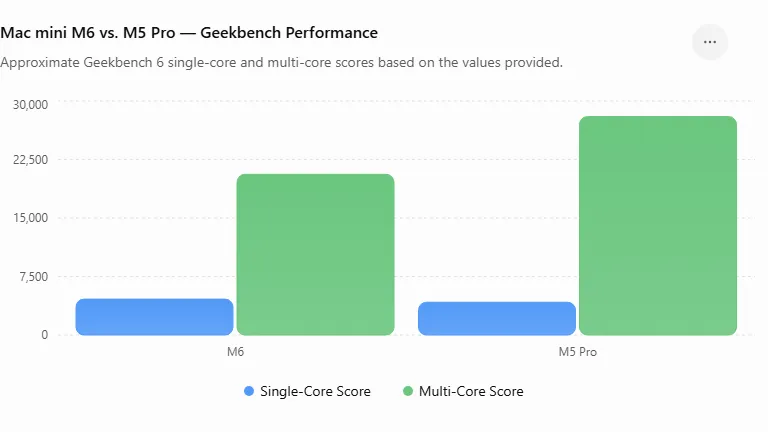
The Mac mini M6 CPU configuration introduces a highly optimized 12-core design consisting of 2 super-performance cores, 4 standard performance cores, and 6 high-efficiency cores. Thanks to its advanced architecture, the M6 dominates in single-thread tasks. In early Geekbench testing, the M6 sets new records with a single-core score exceeding 4,600 points, while pulling off a highly respectable multi-core score of over 20,600 points.
However, for heavy multi-threaded projects, the Mac mini M5 Pro maintains a distinct advantage. Driven by a massive 18-core CPU architecture, the M5 Pro leverages its abundance of high-performance cores to tear through heavy workloads, racking up an incredible Geekbench multi-core score of over 28,000 points. While its single-core score of 4,200 points falls slightly behind the cutting-edge M6, the M5 Pro remains the undisputed champion for software compilation, data rendering, and heavy multitasking.
| Processor | Single-Core | Multi-Core | Core Configuration |
|---|---|---|---|
| M6 | ~4600 | ~20,600 | 12-cores (2 super + 4 Performance + 6 Efficiency) |
| M5 Pro | ~4200 | ~28000 | up to 18-core (6 Super + 12 Performance) |
Graphics Performance and Video Editing
The M5 Pro, paired with a 20-core GPU and third-generation ray tracing, delivers a smooth workflow for 3D design, VFX, and demanding DaVinci Resolve projects. It is also up to 4.5× faster in ray-traced Blender rendering than the previous-generation M2 Pro Mac mini.
The most critical difference for editors is the media engine. The M5 Pro features a dedicated video encode/decode engine, which massively accelerates H.264, HEVC, and ProRes workflows, whereas the M6 lacks this dedicated pro-tier media engine and relies more on raw GPU power. While it handles standard 4K editing but M5 Pro’s exporting speed is unmatched.
The M6 features a 12-core GPU and delivers up to 2× the graphics performance of the previous M4 base model, while also supporting hardware-accelerated ray tracing. However, there remains a significant performance gap in raw rendering workloads, where the M5 Pro’s additional GPU cores give it a substantial advantage.
In the Mac mini M6 vs M5 Pro comparison, the most critical difference for video editors is the media engine. The M5 Pro features a dedicated video encode/decode engine that significantly accelerates H.264, HEVC, and ProRes workflows. In contrast, the M6 relies more heavily on its CPU and GPU resources for demanding video workloads.
The M6 is still capable of handling standard 4K video editing smoothly, but for complex projects involving multiple streams, high-resolution footage, and frequent exports, the M5 Pro’s dedicated media capabilities can provide substantially faster export and processing times.
Memory and Memory Bandwidth: Mac Mini M6 vs. Mac Mini M5 Pro
For modern workflows, raw RAM capacity is only half the story. The speed at which your system can access that memory is called memory bandwidth; you can say the faster it is, the faster the performance bottleneck for memory-intensive tasks like data processing, large-scale media editing, and local AI-intensive tasks.
- 64GB vs. 32GB: The M5 Pro’s 64GB ceiling lets it handle larger work processes entirely in memory without slowdown. The M6’s 32GB cap is fine for 4K editing, but can become a hard wall for heavy professional workloads.
- 307GB/a vs. 170GB/s: The M6’s 170GB/s is praiseworthy as compared to the previous generation M4, which was 120Gb/s. However, the M5 Pro and its 307 GB/s throughput sit in a league of their own.
| Specification | M6 | M5 Pro |
|---|---|---|
| Maximum Unified Memory | 32GB | 64GB |
| Memory Bandwidth | 170GB/s | 307GB/s |
The M5 Pro has a clear advantage in both maximum unified memory and memory bandwidth. Its 64GB memory capacity and 307GB/s bandwidth make it better suited to demanding workloads.
Available ports: Mini M6 vs. Mini M5 Pro
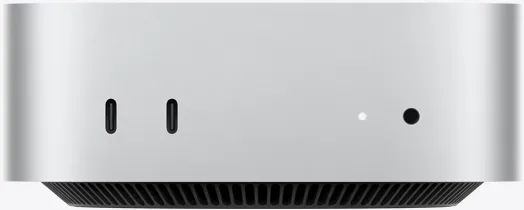
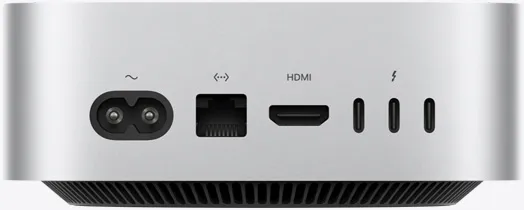
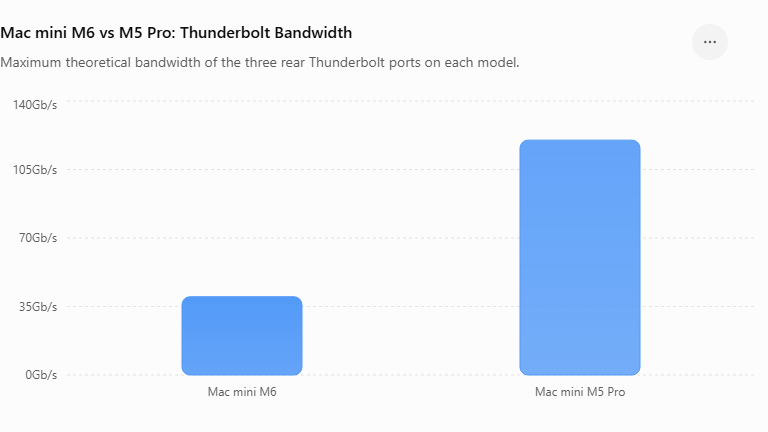
The port layout is physically identical on both, but the Thunderbolt version on the back is the key difference. Both Mac Minis share the same front and rear port arrangements:
- front: 2x USB-C (USB-3) + Headphone jack
- Back: 3x Thunderbolt ports + HDMI + Ethernet
| Port Location | Mac mini M6 | Mac mini M5 Pro |
|---|---|---|
| Front | 2× USB-C (USB 3) + headphone jack | 2× USB-C (USB 3) + headphone jack |
| Rear | 3× Thunderbolt 4 + HDMI + Ethernet | 3× Thunderbolt 5 + HDMI + Ethernet |
| Thunderbolt Bandwidth | Up to 40 Gb/s | Up to 120 Gb/s |
Price vs. Value: Is the M5 Pro Worth the Extra Cost?
The Mac mini M5 Pro is only worth the extra cost if your work depends heavily on multi-core speed, sustained rendering, or more than 32GB of RAM. For the vast majority of everyday users, bloggers, and general productivity workflows, the newer Mac mini M6 provides vastly better value at a much lower entry point.
At a price delta of ₹1,10,000 ($800) between the two base models, the choice comes down to single-threaded responsiveness versus raw multi-core muscle.
Direct Comparison: Price vs. Performance Value
| Feature / Metric | Mac mini M6 (Base) | Mac mini M5 Pro (Base) | Value Assessment |
|---|---|---|---|
| Starting Price | ₹99,900 ($899) | ₹2,09,900 ($1,699) | M6 is over 50% cheaper to get into. |
| Single-Core Speed | ~4,600+ (Geekbench 6) | ~4,200+ (Geekbench 6) | M6 wins, snappier for basic tasks. |
| Multi-Core Speed | ~20,600+ (Geekbench 6) | ~28,000+ (Geekbench 6) | M5 Pro wins for massive parallel tasks. |
| Memory Bandwidth | 170 GB/s | 307 GB/s | M5 Pro has nearly double the data pipeline. |
| Max Configurable RAM | 32 GB | 64 GB | M5 Pro is mandatory if you need heavy virtualization. |
🟢 Why the Base M6 Offers Better Value for Most
- Snappier Daily Responsiveness: Because the M6 is built on Apple’s newer 2nm architecture, its individual “super cores” are faster than the M5 Pro’s cores. Everyday tasks—like opening apps, loading web pages, and basic text editing—will actually feel slightly quicker on the M6.
- Highly Capable 12-Core Setup: A multi-core score of over 20,600 means the M6 handles heavy multitasking, photo editing, and light video creation with ease.
- Low Domain Friction: For content creators, writers, or managing web domains, the M6 offers top-tier hardware without inflating operational costs unnecessarily.
🔵 Why the M5 Pro Justifies Its Premium (For Pros)
- Sustained Heavy Workloads: The M5 Pro features an 18-core CPU setup loaded entirely with performance cores. If you regularly export 4K video timelines, compile huge code repositories, or run local AI models, the 38% to 51% multi-core jump saves you tangible hours.
- Massive Bandwidth Advantage: The 307 GB/s bandwidth stops the machine from choking when scrubbing through massive timelines or dealing with enormous uncompressed assets.
- More Base I/O: The Pro variant typically exposes more Thunderbolt ports and supports a higher number of external displays natively.
Final Verdict: Mac Mini M6 vs. M5 Pro
The Mac mini M6 vs. M5 Pro comparison ultimately comes down to your workload. The Mac mini M6 offers excellent performance, efficiency, and value for everyday productivity, coding, photo editing, and standard 4K video editing; it also delivers significantly better performance compared to the Mac Mini M4.
The M5 Pro is better suited to demanding professional workloads, thanks to its higher CPU/GPU core count, greater memory bandwidth, higher memory capacity, and faster connectivity. For most users, the M6 should provide more than enough performance.
Related Readings
The Mac Mini M6 vs. M5 Pro: FAQ
Is 32GB Unified RAM enough for the Mac Mini M6?
For most users, 32GB of unified memory is sufficient for productivity, coding, photo editing, and moderate video editing.
Which Mac mini is better for gaming?
The M5 Pro’s additional GPU resources make it more suitable for demanding graphics workloads. However, game compatibility on macOS should also be considered rather than relying solely on GPU performance.
Which Mac mini is better for video editing?
The two models target different workloads. The Mac Mini M6 focuses on efficiency, newer architecture, and everyday performance. The M5 Pro delivers more CPU/GPU power for demanding professional workloads.



[…] Mac Mini M6 vs. M5 Pro: Which Mac Mini is Better for Heavy Workflows […]